
Email Template Builder & MJML Customization Guide
Design pixel-perfect, high-converting responsive email templates using Cartwheel's built-in MJML editor, real-time live preview engine, and dynamic Handlebars merge variables.
Overview of Email Templates
In Cartwheel, all retention and recovery sequence emails are built using MJML (Mailjet Markup Language) — the industry standard for responsive email design that renders consistently across Gmail, Apple Mail, Outlook, and mobile devices.
To view and manage your store's email templates, navigate to Cartwheel Admin → Retention Emails → Email Templates (/app/retention/email-templates).
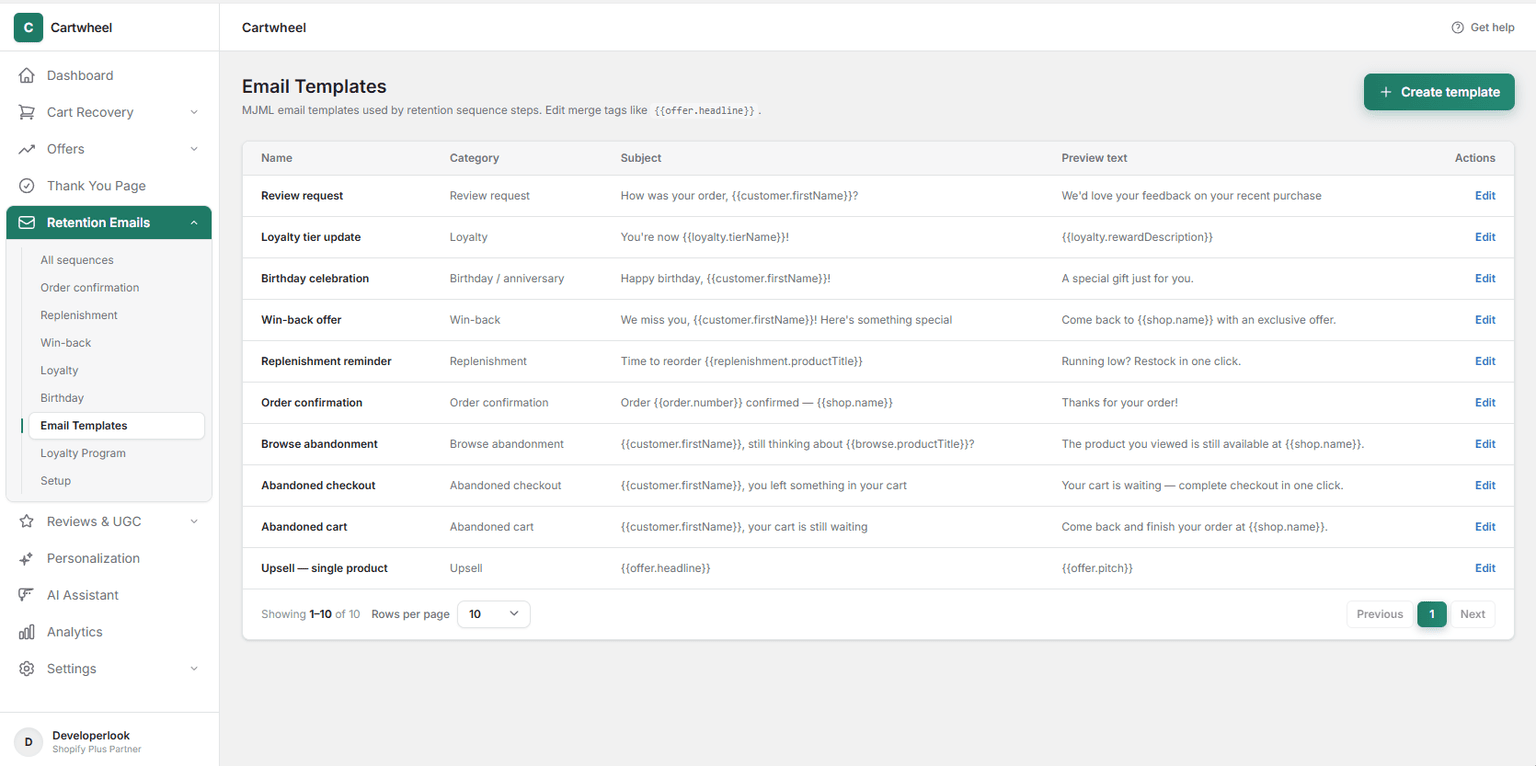
Pre-Built System Templates
Cartwheel automatically provides pre-configured templates for every post-purchase and lifecycle campaign:
| Template Name | Category | Primary Use Case |
|---|---|---|
| Order confirmation | Order confirmation | Transactional receipts featuring order line items, totals, and dynamic cross-sell recommendations. |
| Replenishment reminder | Replenishment | Automated restock notices with 1-click reorder checkout buttons. |
| Win-back offer | Win-back | Lapsed customer comeback incentives with single-use discount codes. |
| Loyalty tier update | Loyalty | VIP tier level-up announcements and unlocked tier perks. |
| Birthday celebration | Birthday / anniversary | Milestone birthday greetings with celebratory gift vouchers. |
| Abandoned checkout | Abandoned checkout | Multi-step checkout recovery drips with direct cart-restore URLs. |
| Abandoned cart | Abandoned cart | Incomplete shopping cart reminders displaying saved items. |
| Browse abandonment | Browse abandonment | Retargeting viewed products for window shoppers. |
| Review request | Review request | Post-delivery feedback prompts with star ratings and photo upload incentives. |
| Upsell — single product | Upsell | Decline follow-up sequence emails promoting complementary products. |
Creating & Editing an Email Template
To create a new email template:
- In Retention Emails → Email Templates, click + Create template in the top right action header (or click Edit next to an existing template in the table).
- Configure the Template content card:
- Name: Enter an internal reference name (e.g. Black Friday VIP Win-Back or Summer Sale Confirmation).
- Subject: Write your email subject line. You can include dynamic merge tags (e.g.
{{customer.firstName}}, your order {{order.number}} is confirmed!). - Preview text: Enter the inbox preheader text displayed next to or below the subject line in customer email clients (e.g.
{{offer.pitch}}or Open for your exclusive 15% voucher).
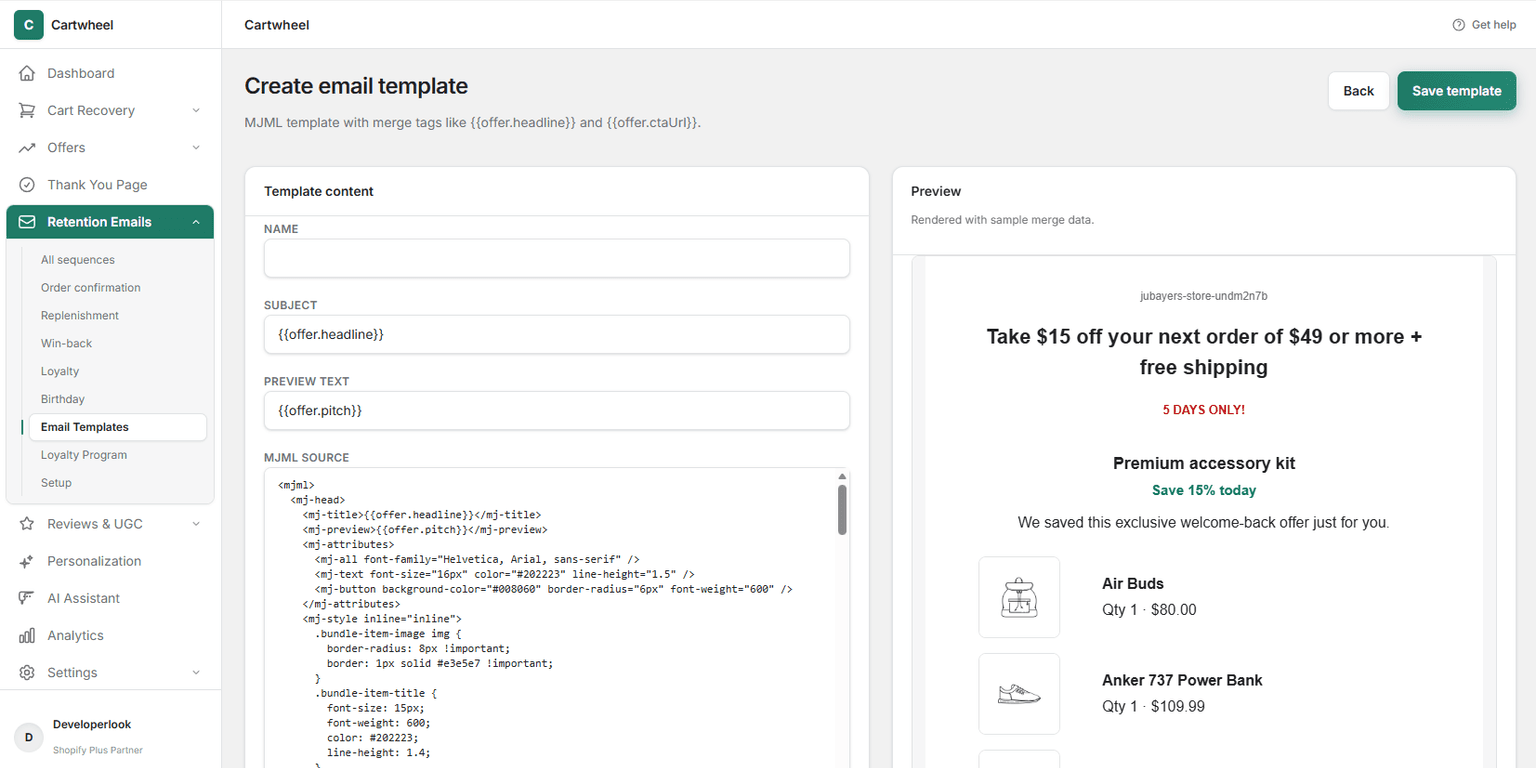
- Edit the MJML Source markup to customize your layout, fonts, brand colors, images, and CTA buttons.
- As you type in the MJML editor, the Preview panel on the right updates instantly with sample customer and order data.
- In the top right action header, click Save template to publish your changes.
MJML Editor & Handlebars Merge Variables
Cartwheel evaluates Handlebars merge tags at runtime when emails are dispatched to customers.
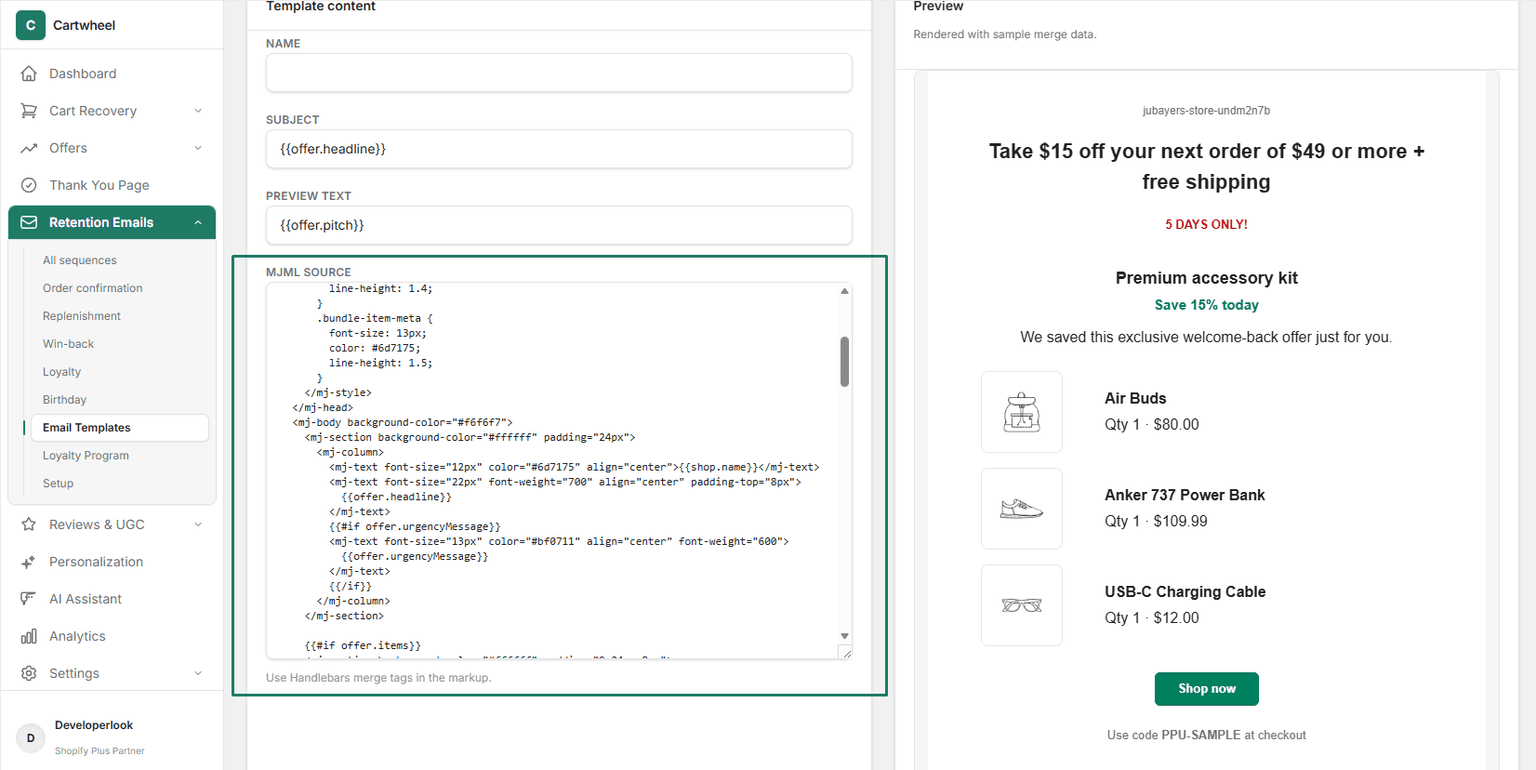
Available Handlebars Merge Tags
You can use the following variables in your MJML markup, subject lines, and preview text:
1. Store & Brand Variables
{{shop.name}}— Your Shopify store name (e.g. Acme Apparel).{{shop.domain}}— Your primary store domain (e.g. acmeapparel.com).{{unsubscribeUrl}}— Compliant 1-click unsubscribe link.
2. Customer Personalization
{{customer.firstName}}— Customer's first name (e.g. Sarah).{{customer.fullName}}— Customer's full name (e.g. Sarah Jenkins).{{customer.email}}— Customer's email address.{{customer.daysSinceLastOrder}}— Number of days since the shopper's last purchase.
3. Order Confirmation Data
{{order.number}}— Order identification number (e.g.#1042).{{order.total}}— Formatted total price (e.g.$133.99).{{order.subtotal}}— Formatted subtotal before shipping and taxes.{{order.shippingTotal}}— Shipping cost.{{order.placedAt}}— Human-readable order timestamp (e.g. Jun 27 at 1:46 am).{{order.shippingAddressHtml}}— Pre-formatted HTML shipping address.{{#each order.lineItems}}— Iterates over purchased items ({{title}},{{quantity}},{{price}},{{imageUrl}}).
4. Linked Offers & Upsells
When a sequence step has a Linked offer, Cartwheel exposes these promotional variables:
{{offer.headline}}— Offer banner headline (e.g. Take 15% off your next order).{{offer.pitch}}— Persuasive value pitch copy.{{offer.urgencyMessage}}— Urgency tag (e.g. 5 DAYS ONLY!).{{offer.productTitle}}— Featured offer product title.{{offer.productImageUrl}}— Featured product image.{{offer.price}}— Discounted offer price.{{offer.discountLabel}}— Savings badge (e.g. Save 15% today).{{offer.discountCode}}— Auto-generated single-use Shopify coupon code.{{offer.ctaUrl}}— Direct checkout link with the discount code pre-applied.{{#each offer.items}}— For multi-product bundles ({{title}},{{price}},{{imageUrl}},{{quantity}}).
5. Replenishment & Reorder
{{replenishment.productTitle}}— Consumable product due for reordering.{{replenishment.daysSincePurchase}}— Days since product purchase.{{replenishment.reorderUrl}}— 1-click cart replenishment checkout link.
6. Loyalty & Milestones
{{loyalty.points}}— Customer's current reward point balance.{{loyalty.tierName}}— Current VIP tier (e.g. Gold).{{loyalty.rewardDescription}}— Unlocked tier perks (e.g. Free shipping on all orders).{{loyalty.nextTierName}}— Next tier name (e.g. Platinum).{{loyalty.pointsToNextTier}}— Points required to reach the next tier.{{milestone.label}}— Milestone type (e.g. your birthday).
Best Practices for MJML Templates
- Keep Colors Consistent with Your Brand:
- Use
<mj-attributes>in the<mj-head>to define global font families, brand hex codes, button border radii, and padding.
- Use
- Use Conditional Handlebars Blocks:
- Wrap optional content in conditional tags (e.g.
{{#if offer.urgencyMessage}}...{{/if}}) so the template adapts cleanly whether or not an urgency message is defined.
- Wrap optional content in conditional tags (e.g.
- Verify Links & Tracking:
- Always use
{{offer.ctaUrl}}or{{cart.recoveryUrl}}for primary CTA buttons. Cartwheel automatically wraps these URLs with click tracking and revenue attribution telemetry.
- Always use
- Always Include the Unsubscribe Link:
- To maintain high sender reputation and spam compliance, always include
<a href="{{unsubscribeUrl}}">Unsubscribe</a>in the email footer.
- To maintain high sender reputation and spam compliance, always include
Related Guides
- Email Provider Setup — configuring Resend API, custom SMTP, and domain authentication (SPF/DKIM/DMARC)
- Order Confirmation Emails — attaching MJML receipt templates to transactional sequences
- Retention Sequences Overview — configuring delivery timelines, audience triggers, and linked offers
- Replenishment Emails — setting up consumable restock reminder templates
- Win-Back Sequences — win-back templates with single-use discount codes
- Loyalty Program & Tiers — point balance update and VIP milestone templates
- Product Reviews & UGC — automated review request email customization