
Loyalty Program & Tier Sequences Guide
Build long-term customer lifetime value (LTV) and brand advocacy with Cartwheel's integrated loyalty points engine, customizable VIP tier ladder, and automated lifecycle email sequences.
Overview: How Cartwheel Loyalty Works
Cartwheel turns one-time purchasers into repeat brand champions by automatically tracking customer points balances and tier status directly within your Shopify ecosystem.
Part 1: Configuring Your Loyalty Program & Tier Ladder
Set up points earning ratios and custom tier perks in the Loyalty Program dashboard.
Step-by-Step Configuration
- In Cartwheel Admin, click Loyalty Program in the primary navigation sidebar (
/app/loyalty).
Step 1: Configure Points & Earning Rules
In the Points & Rules card:
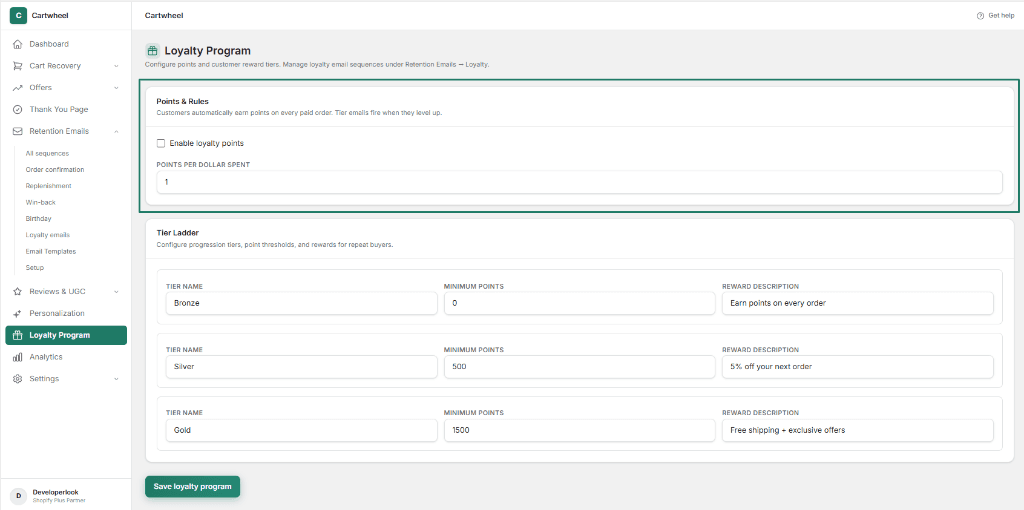
- Check the Enable loyalty points checkbox to activate points calculation across all paid orders.
- In the POINTS PER DOLLAR SPENT field, set your desired points earning multiplier (e.g., enter
1for 1 point per $1.00 spent, or5for 5 points per $1.00 spent).
Step 2: Configure the VIP Tier Ladder
In the Tier Ladder card:
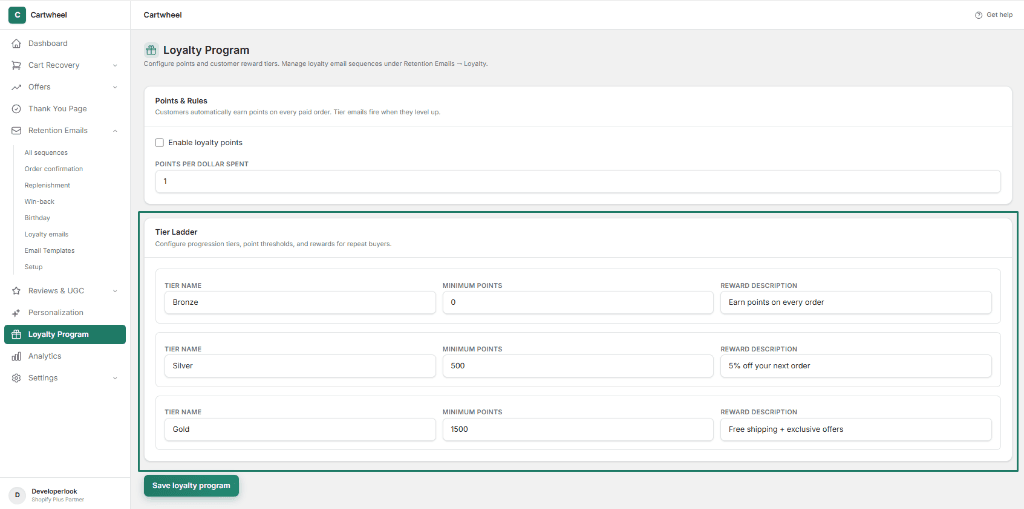
- Customize membership levels and progression thresholds:
- TIER NAME: Give each tier a recognizable title (e.g. Bronze, Silver, Gold, or Platinum VIP).
- MINIMUM POINTS: Set the cumulative point threshold required to attain each tier (e.g.
0for Bronze entry level,500for Silver,1500for Gold). - REWARD DESCRIPTION: Summarize the customer benefit (e.g. "Earn points on every order", "5% off your next order", "Free shipping + exclusive offers").
- In the bottom action bar, click the green Save loyalty program button to publish your settings.
Part 2: Managing Loyalty Retention Sequences
Once your points ladder is defined, build automated email workflows to celebrate tier upgrades, notify customers of points earned on orders, and incentivize subsequent purchases.
Loyalty Sequences Dashboard
Navigate to Cartwheel Admin → Retention Emails → Loyalty emails (/app/retention/sequences?type=LOYALTY):
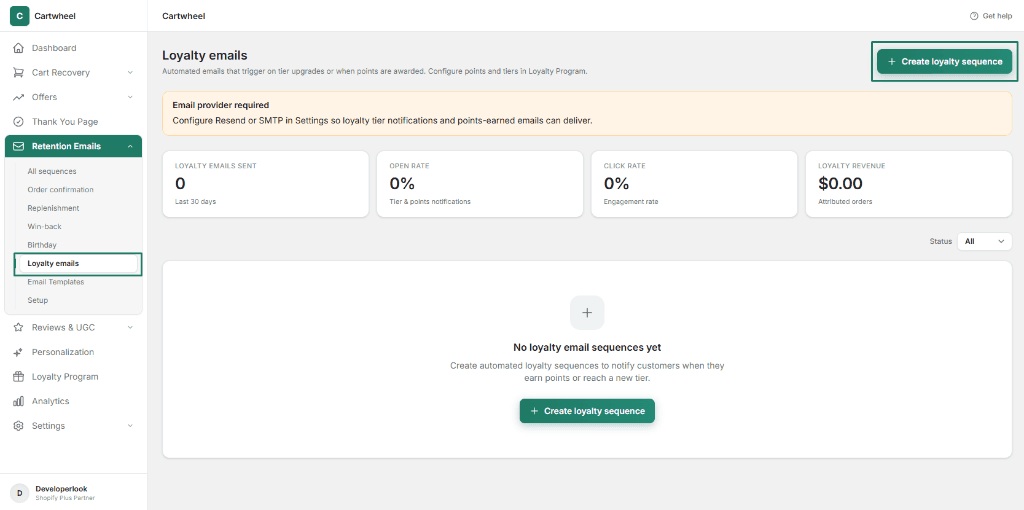
- Performance Metrics: Monitor live sequence stats across Loyalty Emails Sent, Open Rate, Click Rate, and Loyalty Revenue.
- Status Filter: Filter sequences by All, Active, Draft, or Paused.
- + Create loyalty sequence: Top action button to start a new automated loyalty sequence.
Creating a Loyalty Sequence
To launch a new loyalty workflow:
- In the top right header of the Loyalty emails page, click the + Create loyalty sequence button.
Step 1: Configure Sequence Settings & Trigger Event
In the Sequence settings card:
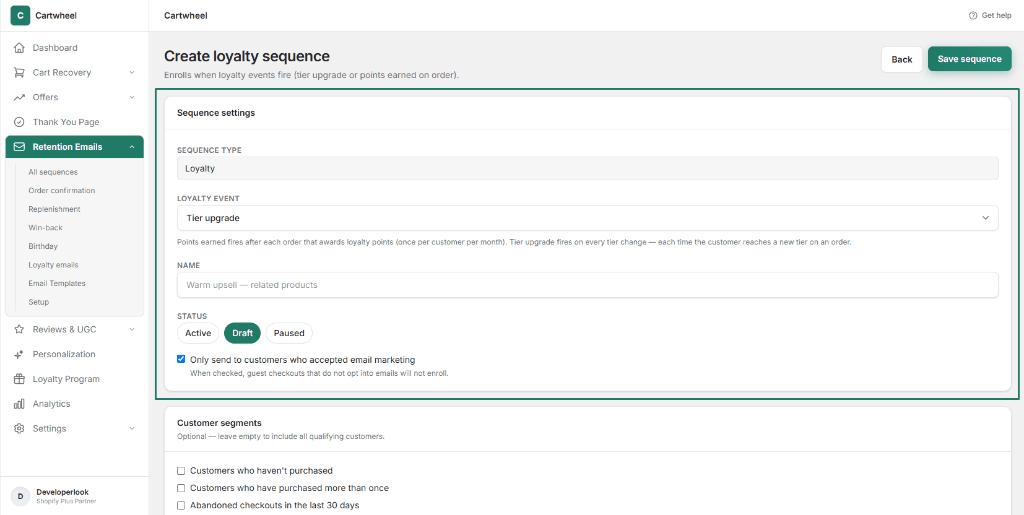
- Sequence Type: Displays
Loyalty(fixed system sequence type). - Loyalty Event: Select the trigger condition that enrolls qualifying shoppers:
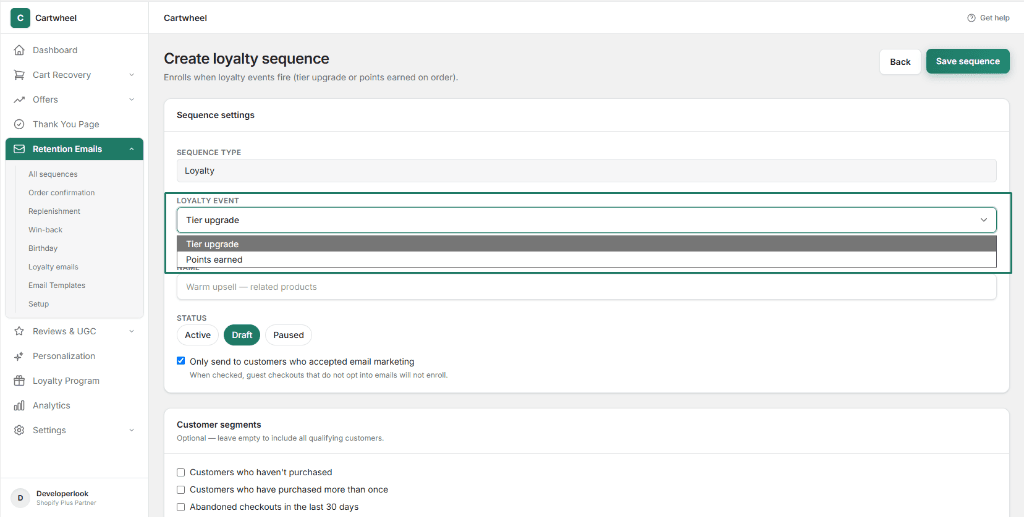
- Tier upgrade: Fires on every tier change each time a customer levels up to a new VIP tier on a paid order.
- Points earned: Fires after each order that awards loyalty points (throttled to once per customer per calendar month to prevent inbox fatigue).
- Name: Enter an internal reference name (e.g. VIP Tier Upgrade Celebration or Points Earned Reward Drip).
- Status: Select operational status:
- Draft: Keep selected while designing templates and configuring delays.
- Active: System actively listens for loyalty events and dispatches scheduled emails.
- Paused: Temporarily pauses sequence sends without unenrolling active customer queues.
- Marketing Consent: Check Only send to customers who accepted email marketing to ensure privacy compliance.
Step 2: Target Customer Segments & Local Audience Rules
Target specific customer cohorts and order spend thresholds:
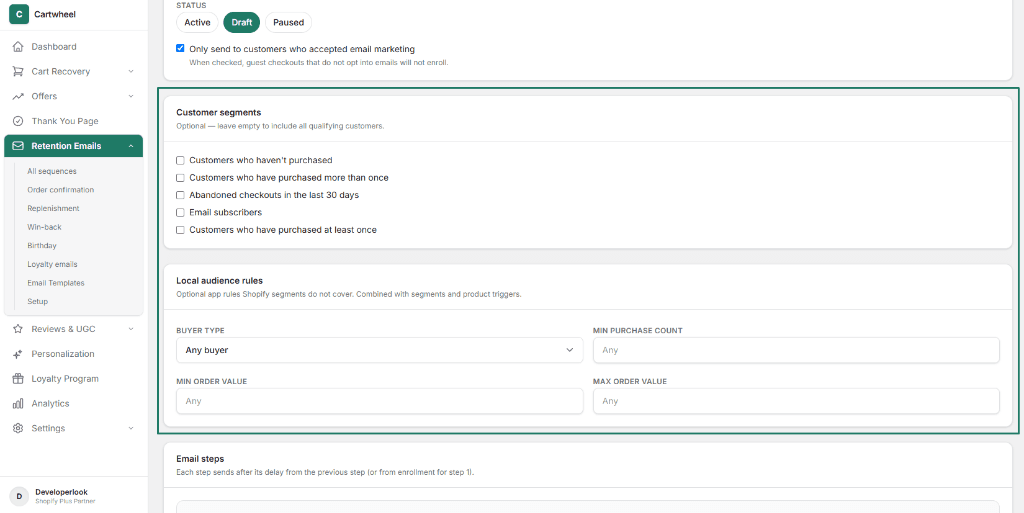
- Customer Segments: Check any synced Shopify customer cohorts (e.g. Email subscribers, Customers who have purchased more than once). Leave unchecked to target all qualifying loyalty members.
- Local Audience Rules:
- Buyer Type: Select Any buyer, First-time, or Returning.
- Min Purchase Count: Require repeat purchase milestones (e.g. Purchases ≥ 2).
- Min Order Value / Max Order Value: Bound order spend requirements (e.g. Min $50.00).
Step 3: Configure Email Steps & Linked Offers
In the Email steps card, define your sequence schedule and templates:
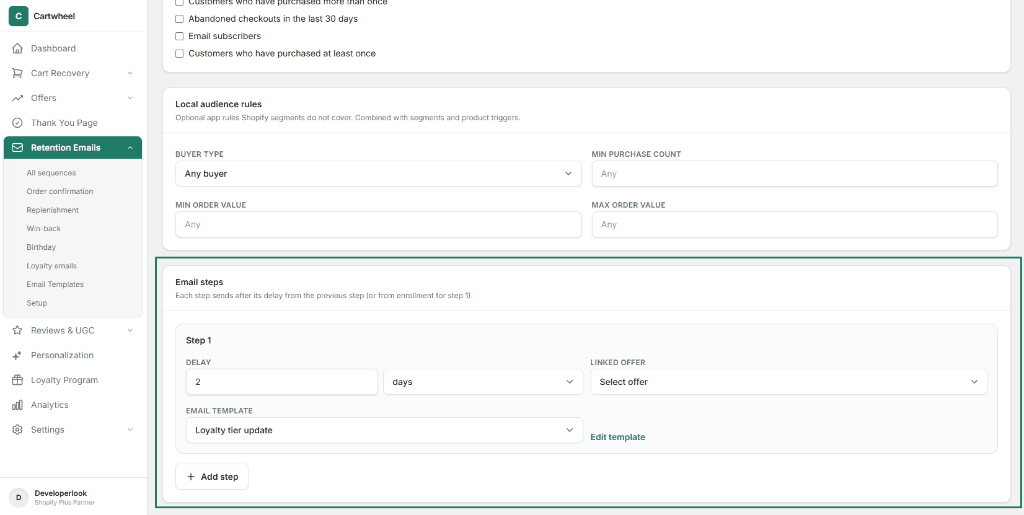
- Step 1 Delay: Set the timing interval (e.g.
2 daysor0 hoursfor immediate dispatch upon tier upgrade). - Linked Offer: (Optional) Select a Cartwheel cross-sell/upsell offer to embed interactive discounted product recommendations into the email.
- Email Template: Choose your branded email template (e.g. Loyalty tier update). Click Edit template to customize headings, buttons, and layouts in the MJML visual builder.
- Multi-Touch Drips: Click + Add step to configure follow-up reminder emails.
- In the top right header, click Save sequence to publish your automated loyalty flow.
Dynamic Loyalty Merge Tags Reference
Use the following Liquid-style merge variables in your email templates and Thank You Page Widgets to display personalized customer loyalty data:
| Merge Tag | Description | Example Output |
|---|---|---|
{{loyalty.points}} | Total accumulated loyalty points balance | 1,520 |
{{loyalty.pointsEarned}} | Points awarded on the most recent paid order | 120 |
{{loyalty.tierName}} | Current VIP tier level name | Gold |
{{loyalty.rewardDescription}} | Configured perks and benefits for the current tier | Free shipping + exclusive offers |
{{loyalty.nextTierName}} | Name of the next attainable VIP tier | Platinum VIP |
{{loyalty.pointsToNextTier}} | Remaining points needed to reach the next tier | 480 |
Cross-Module Loyalty Integrations
Cartwheel's loyalty engine integrates seamlessly across all post-purchase touchpoints:
- Thank You Page Suite: Add the Loyalty Balance block to order confirmation pages so shoppers immediately see the points they earned on their purchase.
- Social Share Claim: Reward shoppers with bonus loyalty points when they share their purchase on Instagram, X, Facebook, or TikTok.
- Product Reviews & UGC: Award bonus loyalty points to customers who leave verified product reviews and upload customer photos.
- Personalization & Segmentation: Build high-converting checkout upsell funnels specifically targeted at your VIP loyalty tiers.
Related Guides
- Retention Sequences Overview — managing storewide lifecycle campaigns
- Order Confirmation Emails — post-purchase transactional sequences
- Replenishment Emails — automated product reorder cycles
- Win-Back Sequences — re-engaging lapsed buyers with loyalty incentives
- Birthday Sequences — automated birthday rewards and point gifts
- Email Template Builder — designing responsive MJML emails
- Email Setup & Mail Providers — connecting Resend, SMTP, and testing delivery