
Settings & Integrations Guide
Manage email delivery engines, theme extension integrations, and store setup diagnostics in the Cartwheel Settings workspace.
Overview: Settings Hub
Navigate to Cartwheel Admin → Settings (/app/settings). The Settings workspace is organized into two primary tabs:
- General: Store setup status diagnostics, active email engine overview, and Shopify App Store pricing.
- Email Provider: High-deliverability transactional email gateways (Resend API, Native SMTP, and Klaviyo integration) with instant deliverability testing.
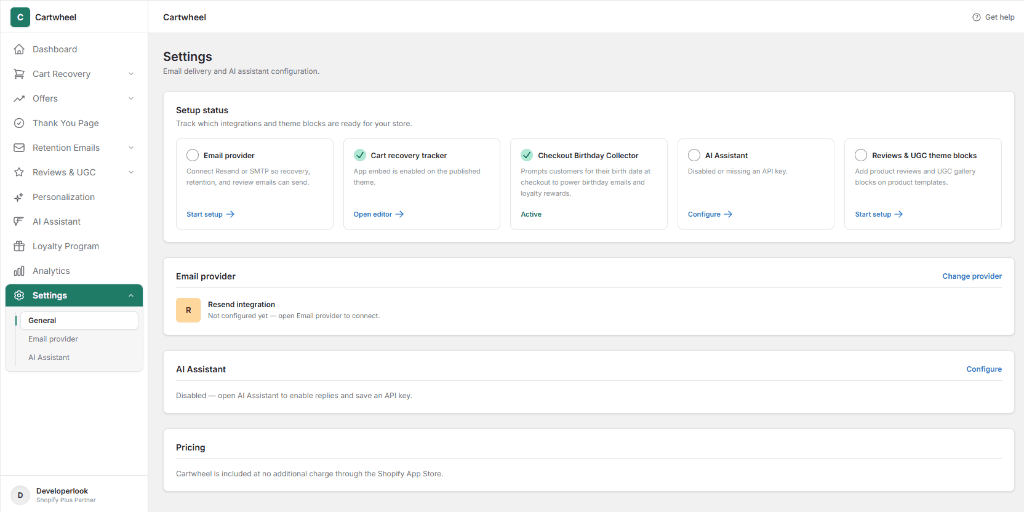
1. Store Setup Status & Diagnostics
In the General tab, the Setup status section monitors store health across core extensions and configurations:
| Integration / Block | Status Indicator | Action & Deep Link | Description |
|---|---|---|---|
| Email provider | Circle / Green Checkmark | Start setup → / Manage → | Connect Resend API or Native SMTP so cart recovery, retention flows, and review request emails can send. |
| Cart recovery tracker | Green Checkmark | Open editor → / Start setup → | Verifies whether the Cartwheel theme app embed is active on your live published Shopify theme. |
| Checkout Birthday Collector | Green Checkmark | Active | Prompts customers for their birth date during checkout to power automated birthday emails and loyalty rewards. |
| Reviews & UGC theme blocks | Circle / Green Checkmark | Start setup → | One-click theme editor deep link to add Product Reviews and UGC Gallery blocks to your theme's product template. |
2. General Overview Panels
Below the setup status grid, primary summary cards provide quick status overviews:
Email Provider Overview
Displays your currently connected email delivery service (e.g. Resend integration · Sending from [email protected]). Click Change provider in the top right to switch gateways.
Pricing
Cartwheel is fully included at no additional charge through the Shopify App Store.
3. Configuring Email Delivery Providers
In the Email provider tab, choose and connect your store's transactional mail delivery gateway:
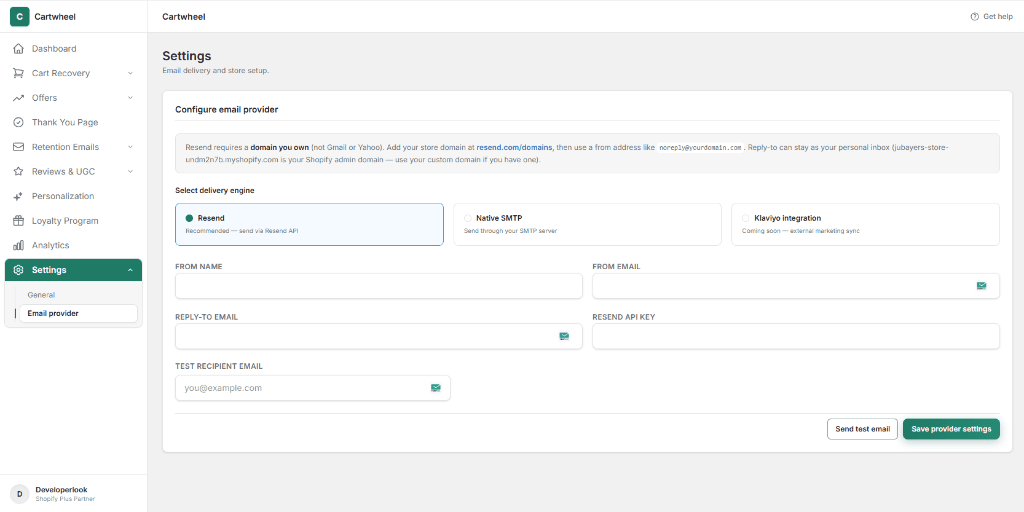
Cartwheel supports three delivery options:
- Resend (Recommended): High-speed API delivery with verified custom domains and automated bounce tracking.
- Native SMTP: Connect any corporate or transactional SMTP mail server (Mailgun, SendGrid, Amazon SES, Google Workspace).
- Klaviyo integration (Coming soon): External marketing event synchronization.
Related Guides
- Email Provider Setup Guide — detailed domain DNS verification and webhook setup
- Installation & Setup Guide — enabling Shopify Theme App embeds
- Product Reviews & UGC Guide — configuring review blocks and social UGC
- Birthday Emails Guide — automating customer birthday rewards from checkout dates
- Smart Personalization Guide — customer audience segmentation